Access GovHK via Assistive Tools for the Visually Impaired
Main Content
GovHK takes into account the needs of users of assistive tools such as screen readers or screen magnifying software. Here you can learn about these tools and what features GovHK has built in to help them browse GovHK.
What Screen Readers Do
A screen reader is an audio computer program that reads out the content displayed on a computer screen for visually impaired people. The reader can also output the content to Braille. In Hong Kong, three of the common screen readers are:
- NonVisual Desktop Access (NVDA)
- JAWS Home / Professional
- Windows Light
NVDA is an open source screen reader that supports over 35 languages with switchable speech synthesizer. It is light weight and can be run from a USB drive with no installation. JAWS is also a popular choice among screen readers with voices for different languages. It is available as a commercial product. Windows Light is another screen reader for the visually impaired and non-profit-making organisations. Those who qualify for a copy of Windows Light can register with Retina Hong Kong to apply for a CD of Windows Light. Aside from reading sequential text, as long as a website has a consistent structure, visually impaired users can easily navigate it with the short-cut keys on the screen reader.
Information on NVDA screen readerInformation on JAWS Home / ProfessionalInformation on Windows Light screen reader (Available in Chinese only)Using Screen Readers on GovHK
Although different readers have different functions and built-in features, there are some common practices in GovHK to make it more accessible for most screen readers.
Use of Style Sheets
GovHK uses Cascading Style Sheets to separate the text content from the visual presentation and layout so that your screen reader can easily read out the content in a correct and easy-to-understand order. GovHK also uses standardised templates that ensure all pages have a consistent format, layout and use of headings. This will allow screen reader users to identify each page more easily.
Consistent Document Structure
People with normal vision can scan through a webpage before starting to read the details. People with visual impairment have a different need. With the help of screen reader software, they first listen to the headings of a webpage and jump directly to the most interested section. In this regard, a clear presentation of content framework or headings to screen reader software is crucial. In technical terms, the content framework is the “document structure” of a webpage. All pages on GovHK are designed with a consistent and logical document structure, which is extremely important in helping the visually impaired users navigate around the portal quickly.
Use of Hidden Text
GovHK has built in a hidden link ”skip main content” right on top of every webpage. The hidden link allows screen reader users to skip over standard parts of the website that are basically the same for every page, such as the logo, search buttons and language option buttons. In this way, users of screen readers do not need to hear repeated information.
Hyperlinks that are visible to people with normal vision may be confusing to screen reader users. To make such hyperlinks meaningful when they are read out, hidden texts are used throughout GovHK. These hidden texts are not visible on screen, but can be read out by screen readers. By introducing hidden texts, visually impaired users can more easily navigate the website and access the information they need.
Use of Alternate Text
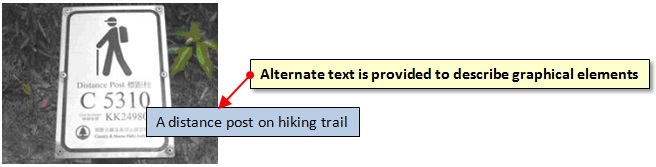
All graphical elements such as photos, logos and banners are supplemented by alternate text descriptions for screen readers. In this way, users can still know what these graphical elements represent.
Presentation of Hyperlinks
Special consideration has been given to the presentation of hyperlinks on GovHK to make them easily accessible by both users with normal vision and those using screen readers. Hyperlinks can be embedded in a paragraph, within bullet points or presented on separate lines after the related paragraphs. This not only makes it easier for general users to spot which link they need, but also for screen readers to read out the underlying website address (URL) of the hyperlinks.
The wording of each link on GovHK has also been carefully chosen to aid screen reader users. Hyperlinks that use phrases such as 'click here' or 'here' describe nothing of the content that the link leads to. In GovHK, the hyperlinks are usually descriptive, providing a brief summary of the content to follow.
What Screen Magnifying Software Does
Microsoft Windows operating system and Mac OS X have built-in screen magnification feature.
Screen magnifying software such as SuperNova Magnifier, Virtual Magnifying Glass, ZoomText and MAGic enlarges the content displayed on a computer screen up to 60 times. Users can choose the magnification level that best suits their personal needs. This kind of software can also display webpage content in black and white or in monochrome. In this way, content can be displayed in high colour contrast.