Information Security
Information Security
-
Q1.Will my online payments for government e-services be affected if my computer has Internet security software installed?Ans
Given the wide spectrum of functionality of the Internet security software on the market, there is no definite answer to this question. So far, in the tests we have conducted for Kaspersky Internet Security software, we found that a window will show to prompt the user to switch to a protection mode during the payment process of some government e-services. If the protection mode is on, the system will display an error message [PAY-E-0000]. We recommend users to add government e-service webpages to Kaspersky before using the online payment function. Please refer to the following link:
If you encounter other problems, please contact the corresponding departments for further support.
-
Q2.What do I need to know about data protection when using GovHK online services?Ans
GovHK uses TLS protocol to encrypt data during network transmission to protect your personal data. All personal data you provide to the Government via GovHK are secured, and access to them is restricted to authorised personnel only.
For general tips on information security, please visit the following pages on the InfoSec website:
-
Q3.What authentication methods do GovHK online services use?Ans
Different GovHK online services may apply different authentication methods as appropriate for the levels of security required by their transactions with the users. Possible authentication methods include:
- user ID and password;
- "iAM Smart"; or
- digital certificate stored on a floppy disk, hard disk or USB flash drive, whereby user will be required to enter a password and specify where the certificate is stored.
Each online service will specify the applicable authentication method(s). Please refer to the FAQs of individual service for details.
-
Q4.I got warning messages saying "The security certificate was issued by a company that is not trusted" when using GovHK online services. What should I do?Ans
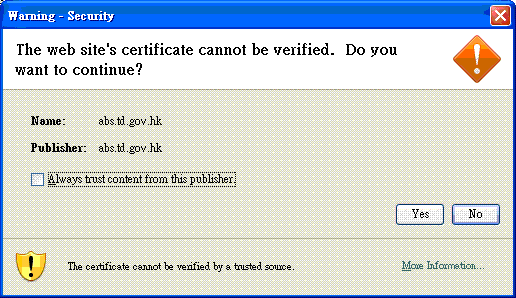
GovHK online services make use of the certificates issued by the Hongkong Post. You should configure your Java software to recognise certificates issued by the Hongkong Post. Please follow the steps below:
- Download “Hongkong Post Root CA 1”, "Hongkong Post e-Cert CA 1 - 10" and “Hongkong Post e-Cert CA 1 - 14” from Hongkong Post Root CA Certificates page to your hard disk. You need to right click each of the links as highlighted in Q3 and select “Save Link As” to store the certificate file to your hard disk.
- Start Windows Control Panel and open “Java”
- Select the tab “Security” and then the button “Certificate”
- Select “Secure Site CA”
- Click “Import”, change the file type to “all files” and select the “Hongkong Post Root CA 1” certificate that you have downloaded to your hard disk in step 1
- Repeat step 5 for “Hongkong Post e-Cert CA 1 - 10” and "Hongkong Post e-Cert CA 1 - 14"
-
Q5.I got warning messages saying "This connection is Untrusted" with error code "sec_error_unknown_issuer" when using GovHK online services with Firefox. What should I do?Ans
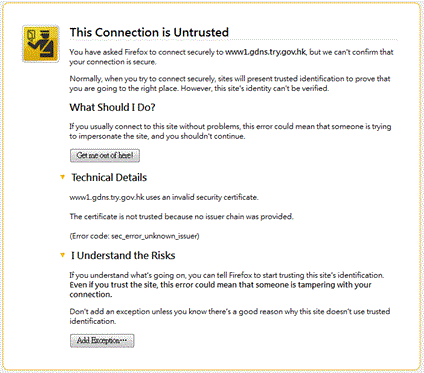
GovHK online services make use of the certificates issued by the Hongkong Post and your Firefox browser cannot recognise these certificates. Please visit the following pages to download and install “Hongkong Post e-Cert CA 1 - 14" from Hongkong Post:
If the problem persists after installing the Hongkong Post Root CA Certificates, please report the problem to the GovHK Help Desk at 183 5500 or email to enquiry@1835500.gov.hk.